Kafka vs RabbitMQ: When to Use Which
Kafka and RabbitMQ both move messages between services, but they solve different problems. RabbitMQ is a classic message broker built around queues and routing. Kafka is a distributed commit log built for high-throughput event streams, retention, and replay. Mixing them up usually leads to the wrong operational cost, or the wrong delivery semantics.
This post covers how each model works (with visuals), what they share, where they diverge, and a practical guide for when to pick which.
Two mental models
RabbitMQ: point-to-point (work queue)
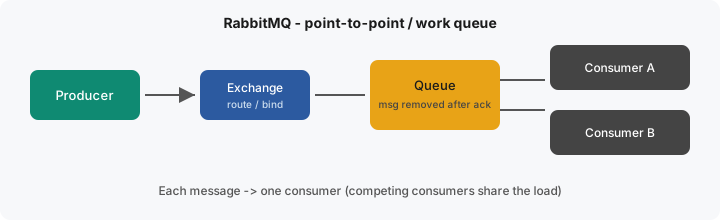
Think of RabbitMQ as a smart post office. Producers publish to an exchange. The exchange routes messages into queues based on bindings/routing keys. A consumer then pulls a message, processes it, and acknowledges it. After a successful ack, the message is typically gone from the queue.
Competing consumers on the same queue split the work: each message is delivered to only one consumer.
Kafka: distributed log (pub/sub with replay)
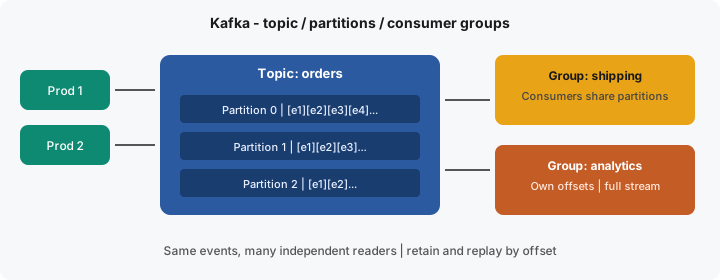
Kafka stores events in an append-only topic, split into partitions for scale and ordering. Producers append; consumers read by offset. Messages are not deleted when read; they stay until retention (time or size) expires.
Independent consumer groups each get their own view of the same topic. Within a group, partitions are shared so work is parallelized without duplicating the same partition to two members of that group.
Similarities
- Async decoupling: producers and consumers do not need to be online at the same time.
- Horizontal scale of consumers: both can parallelize processing (queues with multiple workers; Kafka with more partitions / group members).
- At-least-once delivery in common setups: you almost always design consumers to be idempotent.
- Durability options: both can persist messages to disk (with the right config and acknowledgements).
- Backpressure / lag: if consumers fall behind, both surface “work piling up” (queue depth vs consumer lag).
In short: both are infrastructure for reliable asynchronous communication. The fork in the road is whether you need a disposable task queue or a durable event log.
Key differences
| Dimension | RabbitMQ | Kafka |
|---|---|---|
| Primary model | Broker + queues (AMQP-style) | Distributed append-only log |
| After a message is consumed | Message usually removed (acked) | Message kept until retention; consumer offset advances |
| Replay | Not the main use case | First-class (seek / reset offsets) |
| Fan-out | Exchanges, bindings, multiple queues | Multiple consumer groups on one topic |
| Ordering | Per-queue (careful with parallel consumers) | Per partition (key → same partition) |
| Routing | Rich (direct, topic, headers, fanout) | Simpler (topic + key / headers) |
| Latency | Excellent for low-latency task delivery | Optimized for throughput; batching common |
| Throughput | Very good for many apps | Designed for very high volume streams |
| Ops complexity | Usually lighter to run for small/medium setups | Heavier (brokers, partitions, retention, rebalances) |
| Classic fit | Jobs, RPC-ish workflows, Celery broker | Event streaming, analytics, event sourcing |
When to use RabbitMQ
- Background jobs / task queues: send email, resize images, generate PDFs, run Celery workers.
- Complex routing: different message types need different queues, priorities, or TTL / dead-letter policies.
- Request-reply or short-lived work: process once, acknowledge, move on; you do not need months of history.
- Lower operational footprint: you want messaging without running a full streaming platform.
- Per-message flexibility: priorities, delayed messages, selective consumers via bindings.
Rule of thumb: if the message is a command (“do this work”) and success means “someone handled it once,” RabbitMQ (or SQS-style queues) is usually enough.
# Celery + RabbitMQ - fire-and-forget task
from celery import shared_task

@shared_task(queue="email", max_retries=3, autoretry_for=(Exception,))
def send_welcome_email(user_id: int):
    user = User.objects.get(id=user_id)
    send_mail("Welcome!", "...", "noreply@example.com", [user.email])

# From a view - lands in RabbitMQ queue "email"
send_welcome_email.delay(user.id)
When to use Kafka
- Event streaming: continuous flows: clicks, IoT, payments, CDC, metrics.
- Multiple independent consumers: billing, shipping, search indexing, and analytics all need the same
order.placedevents without copying queues by hand. - Replay / rebuild: reprocess history to fix a bug, backfill a warehouse, or rebuild a read model.
- High throughput with ordered keys: partition by
order_id/user_idso related events stay ordered. - Event sourcing / audit-friendly logs: the stream is the system of record (or a durable projection of it).
Rule of thumb: if the message is an event (“this happened”) and several systems must react, now and later; Kafka (or Kinesis) fits better.
# Kafka - append-only event; many groups can read independently
from confluent_kafka import Producer
import json

producer = Producer({"bootstrap.servers": "kafka:9092"})

def publish_order_event(order):
    producer.produce(
        topic="orders",
        key=str(order.id).encode(),
        value=json.dumps({
            "event": "order.placed",
            "order_id": order.id,
            "user_id": order.user_id,
            "total": order.total_cents,
        }).encode(),
    )
    producer.flush()
A simple decision guide
- Do you need to replay history or let new services catch up from day one? → Kafka.
- Is this mostly task distribution (one worker does the job)? → RabbitMQ.
- Do many teams need the same stream independently? → Kafka.
- Do you need fancy routing, priorities, or RPC-ish patterns with modest volume? → RabbitMQ.
- Are you unsure and the use case is “send jobs to workers”? Start with RabbitMQ (or a managed queue). Add Kafka when streaming, retention, and multi-subscriber replay become real requirements; not fashion.
Avoid Kafka by default. It shines when you truly need a durable, multi-subscriber log. For Celery-style work queues, RabbitMQ (or Redis/SQS) is simpler to operate and closer to the problem.
They can coexist
Many production systems use both: RabbitMQ (or a cloud queue) for commands and jobs, Kafka for the canonical event bus. Example: an order service writes to the DB + outbox, relays order.placed to Kafka for analytics and search, and separately enqueues a “send confirmation email” task on RabbitMQ.